
 Homemanager Docs
Homebridge & Homemanager Guide
Practical guide to Homebridge and Homemanager: server installation, plugin configuration, troubleshooting, and smart home management on iPhone and iPad.
Homebridge & Homemanager Guide
Homebridge brings devices into Apple Home that lack native HomeKit support: from smart plugs and sensors to robot vacuums, cameras, and network routers like the FRITZ!Box. As a local bridge, Homebridge translates commands directly into Apple's HomeKit protocol.
Open source and community-driven
Homebridge is a free open-source project published under the Apache-2.0 license, maintained and expanded by a global community. Thousands of open-source plugins make it possible to connect accessories from diverse ecosystems without relying on cloud services, running entirely within your local network.
ParceApp has been part of this community since 2018. As an independent developer team, we build Homemanager, a companion app designed for iOS and iPadOS. While Homebridge runs as a service on a server in your home, Homemanager provides a dedicated mobile app to manage your instances, monitor system health, and configure accessories directly from an iPhone or iPad.
How this documentation is organized
This knowledge base focuses on installing, configuring, and maintaining Homebridge.
Every guide covers both traditional setup via the official web interface (Homebridge Config UI X) and mobile administration using the Homemanager app. You can freely choose whether you prefer working in a desktop browser or managing your smart home setup directly from your mobile device.
Note for HOOBS users: Homemanager also connects directly to HOOBS servers. Because this documentation focuses specifically on Homebridge, please consult the official HOOBS Knowledge Base for HOOBS-specific installation and initial setup guides.
New to Homebridge? If you are building your first server, start with our hardware comparison in Choose Your System or jump straight into the Raspberry Pi Setup Guide.
How the components work together
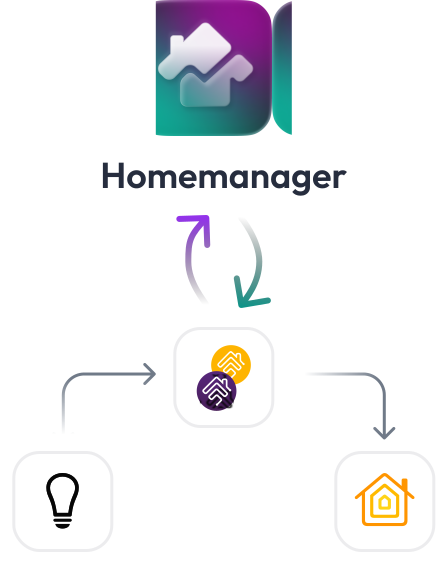
A reliable smart home setup relies on three distinct layers:
- Homebridge Server: Runs continuously on a low-power computer in your local network (such as a Raspberry Pi), a NAS, or inside a Docker container. The server talks to your devices and exposes them to Apple Home using the HomeKit Accessory Protocol (HAP).
- Apple Home (Daily Control): The everyday interface on iPhone, iPad, Apple Watch, Mac, and Apple TV. This is where you switch lights, view sensor readings, organize rooms, and create automations.
- Homemanager or Web Interface (Server Administration): Administrative tools. Here you discover and install plugins, adjust settings, set up child bridges, and apply software updates to keep the server running smoothly.
Homemanager as an iOS Companion
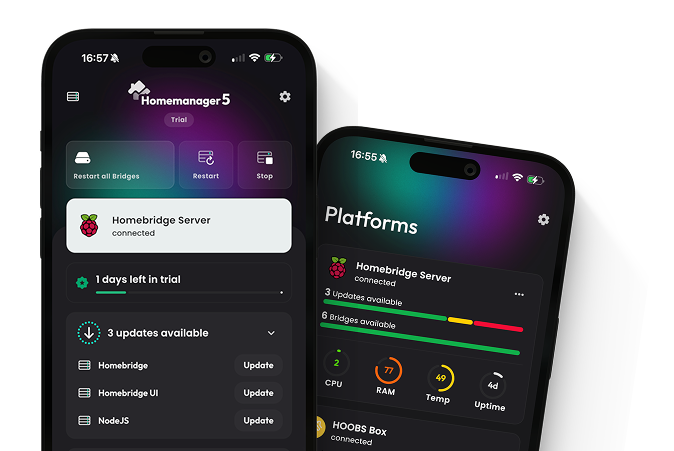
While Homebridge can be administered through its web interface on desktop computers, Homemanager brings server management directly to your iPhone and iPad:
Integration Store: Discover plugins without guessing package names
When connecting a new piece of hardware, you rarely know its exact npm package name. The Integration Store organizes the catalog of over 4,000 community plugins for mobile browsing. Verified badges, trending community favorites, and maintenance indicators are immediately visible. Installing a plugin on your server takes a single tap.
Structured forms and support for Custom UI
Plugins are configured using clean input controls with switches, sliders, and selection pickers, avoiding syntax errors like missing commas or misplaced brackets in the raw config.json. Homemanager is also the only available app to support the official Homebridge Custom UI standard: interactive setup wizards, vendor logins with two-factor authentication, and device discovery flows bundled with plugins run directly on your mobile device. For advanced tweaks and custom parameters, a built-in code editor provides real-time JSON syntax validation.
Comprehensive bridge management and interactive guides
Isolating plugins into child bridges runs accessories in separate processes: an issue in a single plugin will not bring down the rest of your smart home, and it bypasses Apple Home's 150-accessory bridge limit. Homemanager provides complete bridge management with interactive guidance. You can create a child bridge directly while installing a plugin or flexibly reassign existing configurations between bridges later on. You can copy the 8-digit setup code or QR code with a single tap to add the bridge into Apple Home.
Server maintenance and live logs on mobile
From restarting services and updating plugins to installing new Node.js LTS releases: all pending maintenance tasks are grouped into a clear overview and can be triggered on demand. When an accessory stops responding, the mobile log viewer streams server logs in real time with filters for warnings, errors, and specific bridges.
Centralized multi-server management
If you run multiple instances (for example, on a Synology NAS, a Raspberry Pi, or across different properties), you can switch directly between servers in the app. Homemanager discovers instances automatically via Bonjour and brings bridge health, accessories, and pending updates together into a unified mobile view.
Download Homemanager for iPhone and iPad
Available for free on the App Store. Manage Homebridge and HOOBS directly from your iOS and iPadOS device.

Topic Compass
Getting Started
Connect servers across your local network and pair accessories into Apple Home using pairing codes.
Server Setup
Step-by-step guides for Raspberry Pi, Synology NAS, Docker, macOS, and Windows.
Devices & Plugins
Discover verified plugins, configure settings, and isolate accessories with child bridges.
Maintenance & Updates
Keep Node.js LTS, npm packages, and Homebridge core up to date without downtime.
Troubleshooting
Diagnose 'No Response' status, resolve mDNS advertiser issues, and analyze live logs.
Tips & FAQ
Understand how Matter fits alongside Homebridge, optimize local networking, and review common questions.
All Guides at a Glance
1. Getting Started
- Connecting Servers: Automatic Bonjour discovery or manual connection via static IP.
- Pairing with Apple Home: QR code scanning, manual setup codes, and the role of Apple Home hubs (Apple TV, HomePod).
2. Server Installation
- Choose Your System: Raspberry Pi, Synology NAS, Docker, macOS, and Windows compared by power consumption, reliability, and ease of use.
- Raspberry Pi: The standard 24/7 dedicated platform with official image setup and hardware recommendations.
- Synology NAS: Running inside Container Manager (Docker) or as a native package.
- Docker & Containers: Universal setup for Linux servers, Unraid, and TrueNAS using Docker Compose.
- macOS: Quick background service setup on a Mac mini or desktop Mac.
- Windows: Running on Windows 10 and 11 using the official background service installer.
3. Devices & Plugins
- Finding & Configuring Plugins: Identifying quality plugins, verified badges, and visual settings forms.
- Child Bridges: Isolating plugins into separate processes to prevent system crashes and bypass the 150-device limit.
4. Maintenance
- Updating System Software: Upgrading Node.js LTS, npm, and Homebridge core safely.
5. Troubleshooting & Help
- 'No Response' & Clearing Cache: Tuning mDNS advertisers (Ciao vs. Bonjour) and clearing orphaned accessories from cache.
- Startup Errors & Log Analysis: Resolving boot loops, port conflicts, and reading real-time logs.
6. Background & Architecture
- Matter & Homebridge: Why Homebridge remains essential for existing hardware alongside the Matter standard.
- Frequently Asked Questions (FAQ): Answers regarding local network permissions, notifications, remote access, and licensing.