
 Homemanager Docs
Matter & Homebridge
How Matter and Homebridge work together, native Matter bridging in Homebridge 2.0, and how to configure Matter pairing in Homemanager or the web interface.
Matter and Homebridge
Matter is an open smart home standard designed to connect compatible devices to Apple Home, Google Home, and Amazon Alexa simultaneously.
Starting with version 2.0, Homebridge supports Matter natively. Accessories can be exposed over the standard HomeKit Accessory Protocol (HAP) or published directly as Matter devices on your local network.
Where Homebridge is Still Needed
Even as more Matter-certified accessories arrive on the market, the standard does not replace Homebridge for several common smart home setups:
- Older TVs, smart plugs, motorized blinds, and robot vacuums rarely receive firmware updates to Matter. Homebridge keeps these existing devices running in Apple Home.
- Video streaming support in the Matter specification remains limited. Homebridge delivers reliable RTSP camera streams, motion alerts, and picture-in-picture on Apple TV.
- Software utilities like dummy switches, delay timers, and webhook listeners do not exist in Matter, which focuses entirely on physical hardware.
How Matter Works in Homebridge 2.0
Homebridge handles communication through transports:
- HAP (HomeKit): The default protocol used by Apple Home.
- Matter: The cross-platform protocol for sharing accessories with Apple Home, Google Home, Amazon Alexa, or SmartThings.
Plugins declare their supported transports in their package.json with the keywords supports-hap, supports-matter, or both. Technical details for developers are available in the Homebridge GitHub Wiki.
In the Homebridge web interface (version 5.28.0 and later), compatible plugins display a Matter badge on their plugin card. When a plugin only supports Matter, Homebridge automatically disables HAP for that bridge to prevent pairing an empty accessory. To learn how to discover and install these extensions, see the guide on finding and installing plugins.
Apple Home Pairing vs. Matter Pairing
| Criteria | Apple Home Pairing (HAP) | Matter Pairing |
|---|---|---|
| Supported Platforms | Apple Home (iPhone, iPad, Mac, HomePod) | Apple Home, Google Home, Alexa, SmartThings |
| Accessory Coverage | All supported Homebridge device types | Limited by the current Matter specification |
| Cameras & TV Controls | Fully supported | Partially limited or pending in specification |
| Multi-Admin | Apple Home only | Share with multiple ecosystems simultaneously |
| Network Requirements | IPv4 / IPv6, mDNS | Mandatory IPv6 and mDNS on the local network |
| Recommendation | Standard choice for Apple-focused homes | Best when sharing devices with other platforms |
If you control your home exclusively with Apple devices, traditional Apple Home pairing remains the most reliable option. HAP has been refined in Homebridge for years and supports all specialized accessory types.
Network Requirements: IPv6
Matter places stricter demands on your local network configuration than classic HomeKit:
- Mandatory IPv6: Matter controllers (such as Apple TV or HomePod) communicate with Matter devices exclusively over IPv6. If IPv6 is disabled in your router, operating system, or Docker container, pairing will fail.
- Multicast DNS (mDNS): Your router must allow local multicast traffic between devices. Guest networks isolate clients and will block communication with Homebridge.
If accessories drop off or fail to respond, check our troubleshooting guide on resolving unresponsive accessories.
Setting Up Matter Pairing
You can enable Matter through Homemanager on iOS and iPadOS, through the Homebridge web interface (Config UI X), or directly inside your configuration file.
Setup in Homemanager
In Homemanager, all Matter pairing settings are located in the System tab:
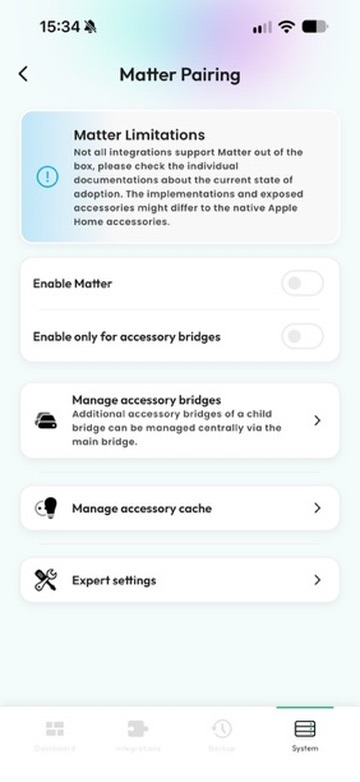
- Open Homemanager and tap the System tab at the bottom.
- Select your bridge and open Matter Pairing.
- Turn on Enable Matter.
Restrict to accessory bridges: Turn on Enable only for accessory bridges if you want to publish standalone external accessories (such as smart TVs or external cameras) over Matter while keeping the main bridge on HomeKit.
- Use Manage accessory bridges to inspect and configure these external bridges centrally, including those spawned by a child bridge.
- Copy the pairing code and add the bridge to Apple Home, Google Home, or Alexa as a Matter accessory.
Setup in Homebridge Web Interface (Config UI X)
In the web interface, you configure transports per plugin:
- Open the Homebridge web interface in your browser and click Plugins.
- Look for the Matter badge on the plugin card to confirm compatibility.
- Click the wrench icon and select Bridge Settings (Child Bridge).
- If the plugin runs as a child bridge, choose your preferred transports. You can enable Matter and disable HomeKit (HAP) if necessary.
- Save your changes and restart the child bridge.
- After restarting, the interface displays the Matter QR code and setup PIN. Connected ecosystems (fabrics) are also listed here.
Manual Configuration in config.json
When editing your configuration manually, add a matter block to your bridge or child bridge definition:
{
  "platforms": [
    {
      "platform": "ExamplePlatform",
      "name": "Smart Lights",
      "_bridge": {
        "username": "0E:2A:4B:11:22:33",
        "port": 51830,
        "matter": {
          "enabled": true
        }
      }
    }
  ]
}
Restart Homebridge after saving. The Matter pairing credentials will appear in the server startup logs.
Practical Constraints
Before switching an installation to Matter, consider two points:
- Not every plugin supports Matter. An accessory can only be published over Matter if the plugin specifically adopts the Homebridge 2.0 Matter API or uses supported standard categories.
- Feature sets can differ between protocols. Certain device controls and sensor behaviors that work in HomeKit have not yet been defined in the Matter specification.
Pairing with Apple Home
Step-by-step instructions for classic HomeKit pairing on iPhone and iPad.
Setting Up Child Bridges
Learn how isolated processes improve server stability and allow granular transport settings.
Finding and Installing Plugins
Learn how to identify verified plugins that offer native Matter support.
Fix Startup Crashes & Read Logs
Resolve Homebridge startup crashes: inspect live logs in Homemanager or terminal, stop boot loops, and fix port conflicts or syntax errors.
App FAQ & Support
Frequently asked questions about Homemanager: differences from the web interface, connectivity troubleshooting, remote access, Matter support, and licensing.