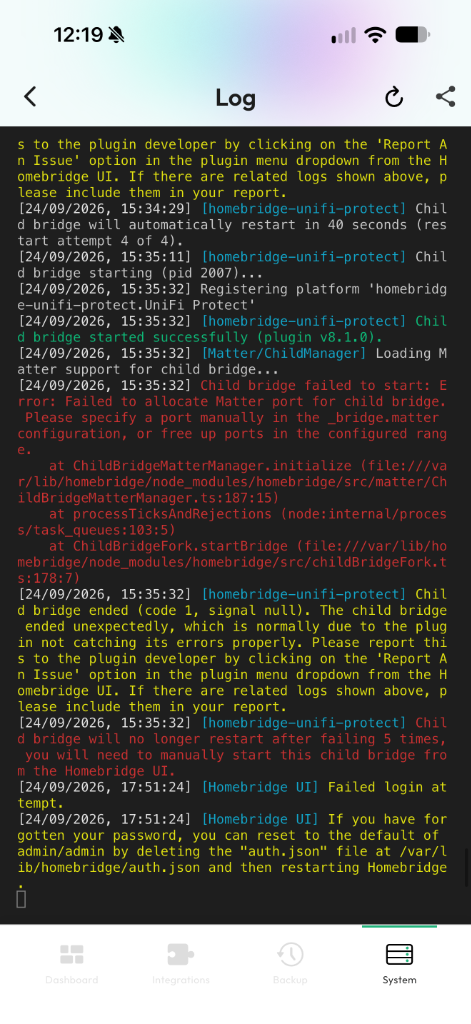
When Homebridge fails to launch after an update or configuration change, it usually enters a restart loop (boot loop): the service crashes during initialization, and the operating system restarts it immediately.
The last lines of the log show why the process stopped.
Use the share icon in the top right corner to copy log entries or export them for troubleshooting help.
Live log with red error highlights in Homemanager
Open the Homebridge web UI in your browser (if the UI service is still reachable).
Open the Status section or click the console icon in the top navigation bar.
The log window streams new lines as they appear.
Connect to your host system via SSH and read the service logs directly:
sudo hb-service logs
On Linux systems running systemd, you can also query the journal:
sudo journalctl -u homebridge -n 50 --no-pager
Debug mode for detailed logs: If standard log output does not reveal the cause, enable Debug Mode (-D) in the Homebridge settings of the web interface to record every network packet and internal event.
Error: listen EADDRINUSE: address already in use :::51826
or:
Error: Failed to allocate Matter port for child bridge.Please specify a port manually in the _bridge.matter configuration...
Cause: Another service occupies the HomeKit port (default: 51826), the web port (8581), or the Matter port assigned to a child bridge.
Fix:
Reboot the host system (sudo reboot) to terminate orphaned Node processes.
If you run multiple bridges or Matter accessories: assign an unused, fixed port in the bridge settings for that plugin. For more details on Matter configuration, see Matter and Homebridge.
SyntaxError: Unexpected token , in JSON at position 1240
Cause: A JSON syntax issue, typically a trailing comma or an unclosed bracket introduced during manual editing.
Fix:
Correct the typo: Open the configuration file in a terminal editor (such as sudo nano /var/lib/homebridge/config.json) and fix the error at the reported line.
Restore a backup on a clean setup: If the file is badly damaged or the service refuses to start, reinstall Homebridge and restore your latest backup archive during the initial setup wizard. All plugins, settings, and Apple Home pairings remain intact.
Prevent errors with Homemanager: When editing settings through structured forms in Homemanager, the app validates inputs before saving, preventing JSON syntax errors from happening.
[homebridge-plugin] Child bridge will no longer restart after failing 5 times
Cause: A plugin throws an unhandled error during startup, often caused by expired account credentials, changed device APIs, or network timeouts.
Fix:
With Child Bridges: If the plugin runs as a child bridge, Homebridge stops restarting it after five failed attempts. The main server stays online. You can edit the plugin settings, disable it, or delete its configuration directly in Homemanager or the web interface. Once corrected, restart the child bridge.
On the main bridge: If the plugin runs on the main bridge, the crash pulls down the entire Homebridge service into a restart loop.
In Homemanager or the web interface: If the UI responds briefly between restart attempts, disable the offending plugin or delete its configuration block.
Via terminal (if the UI cannot load): Open /var/lib/homebridge/config.json in an editor (such as sudo nano /var/lib/homebridge/config.json) and remove the plugin entry from the platforms or accessories array.
Error: The module '...' was compiled against a different Node.js version
Cause: Node.js was upgraded while some plugins still rely on native binary modules compiled for an earlier Node release. For recommended upgrade routines, see Updating System Software.
Fix: Rebuild native dependencies using the service manager:

 Homemanager Docs